Most people will tell you that off-the-shelf custom solutions will cover most of your needs. But it ends up being expensive if you’re comparing it to SaaS platforms.
While SaaS is cheaper and easier to use, choosing between the two is hard. The choice you make will have a domino effect on your business.
The topic between SaaS vs Custom Software is debatable; you need to carefully assess both and see which one closely aligns with your values.
Instead of getting generic advice, this blog will tell you how each of these platforms impacts your business. Practically and strategically.
Introduction to SaaS and Custom Software
Before we start making any comparisons, we must understand basics.
SaaS
It is a cloud-based application that you subscribe to. You have to pay a small subscription fee to use the features. It’s like buying a tailor made suit – Can be used immediately and fits your goals.
Features of SaaS:
Quick deployment
Vendor managed maintenance
Standardized features
Custom Solution
A custom software is designed from the ground up for your business. It’s like building a house. It takes longer to build and the features will be added as per your preferences.
Features of Custom Software:
You get full ownership of your custom software.
Built exactly to your specifications.
Higher cost upfront
Benefits of Custom Software and SaaS
Custom software offers solutions that precisely match your requirements, while SaaS offers readymade solutions at an affordable price. This section will cover the top 3 benefits of each:
Custom Software
Personalization
Custom software is created specifically for meeting your company’s needs. Long-term creation and upkeep of these features may be easier.
Flexibility
Businesses that have a dynamic work culture will benefit from a custom software. New processes can easily be added into the system. Onboarding new hires becomes hassle-free.
Tight Security
Custom software often provides a greater level of security. You’ll find features like encryption and role-based access.
SaaS
1. Affordable
SaaS offers a lower payment upfront. Instead of paying a huge amount, you’ll be paying a small subsciption fee. The cost can be anywhere between Rs 1,000 to Rs 10,000.
2. Fast Deployment
SaaS solutions are ready to use. That means you can get started immediately instead of spending time and effort on custom development.
3. Automatic Updates
When you’re using SaaS, you don’t have to worry about updating it. That responsibility is of the vendor.
SaaS Vs Custom Software: How They’re Different
Before we go deeper, here’s the simplest way to understand the distinction. Check out the table below:
Aspect
SaaS
Custom Software
Cost
Recurring subscriptions
Lower cost upfront
Higher initial investment
Long-term savings
Personalization
Limited features
Full control over functions
Deployment
Fast
Data is accessible through cloud
Slower
Changes in design and development is required
Scalability
Depends on the options provided by the vendor.
Built to grow with your business.
Ownership
Vendor control
Shared with multiple teams
Private and owned by you
You get full ownership
Choose SaaS when you need:
Release your product/service fast
You want a predictable pricing plan
Your team needs an easy solution to use
Choose Custom Software when you need:
You need specific features
You don’t want to spend a monthly fee
You want your software to grow with your business and need full control.
Please note: The commitment is longer for custom software. If you’re unhappy with SaaS, you have the option to cancel the subscription. You might have to hire software developers help you get started with custom software.
Who Chooses SaaS or Custom Software?
Features play a small part when choosing between the two. Other aspects also matter, such as:
Industries like finance and healthcare need software with strict compliance.
They need a solution that adapts to their proprietary processes.
Their biggest challenge? Maintaining the system with their growing requirements.
Behavioural Patterns of SaaS Vs Custom Software Users
SaaS Users Switch More Often
They change tools when pricing changes, or a better alternative arrives. This is also why organizations depend on SaaS management tools like BetterCloud or Flexera.
Custom Software Users Rarely Switch
They improve, rebuild, or scale their systems instead. It’s a long-term commitment; the software becomes part of the company’s identity.
Hybrid Approaches Are Common
Many businesses start with SaaS, then gradually build custom components where SaaS falls short.
AI Features in SaaS and Custom Software
SaaS will focus on accessibility and standardization of the processes. These features are designed to work within the cloud environments. Some of the AI features include:
Virtual Assistants: These chatbots are meant to assist with navigation, manage routine duties and guide users.
Predictive Analytics: Businesses can look into trends and keep an eye out for unsafe behaviour with predictive analytics.
Automated Workflows: AI is able to automate everyday workflows. This saves manual effort and time.
Custom software focuses on business proprietary processes. The AI features in the custom software are designed to solve specific challenges you might face. This approach allows for:
Deep Integrations: These AI features can be integrated in custom software and your business process.
Specialized Algorithms: AI models can be customized depending on the company and their requirements.
5 Things to Consider When Choosing Between SaaS and Custom Software
Let’s get practical now. This is the direction most companies will choose:
1. Target Market
When time is sensitive, efficiency matters. In this scenario, most companies will rely on SaaS. When differentiation dominates, custom software takes the crown.
2. Business Process
You’d be surprised to know the number of revisions you need to do in your processes, just to make a tool fit. Sometimes that’s a good thing, sometimes it’s not. That’s why you need to ask yourself:
Are my processes pretty standard? If yes, choose SaaS.
Will my processes change? Is it dynamic? If you answered yes, then choose custom software
3. Development Considerations
SaaS relies more on configurations while custom software requires expertise in JavaScript, .NET, Python, and SQL. SaaS configurations can take a few days or weeks depending on the integration.
Custom software will take longer to build and often need skilled developers.
4. Long-Term Considerations
While debating between SaaS Vs Custom software – Go beyond 6 months. Will the software support your business after 3 or 5 years? How flexible is it? Will it work with your entire tech stack?
If your SaaS vendor changes the features or raises the price, then what? These questions aren’t hypothetical; these questions are pondered over.
5. Cost Analysis
As we know, SaaS is cheaper than custom software. Both come with hidden costs that includes:
Maintenance
Training
Process changes
Integrations
Downtime
The solution you choose will help you save on costs.
When it comes to choosing between SaaS and custom software, everything depends on what your business needs. Not what’s trending or what others are using.
While SaaS gives you speed and an affordable choice. On the other hand, custom software gives you control and promises a long-term value.
If your workflows are standard → Choose SaaS
If your long-term goals demand to be different → Choose custom software
In either case, pick a path of action that advances your long-term objective. You can spend money on custom software development services if you’re not sure how to begin.
FAQ
Frequently Asked Questions
Q1. Which is more cost effective? SaaS or custom software?
SaaS is cheaper. But costs can be added if you need more specific features. Custom software is expensive upfront but more affordable to maintain long-term.
Q2. Can I use SaaS and custom software?
Absolutely! A hybrid approach has become common. Many companies use SaaS for general functions and custom software for important processes.
Q3. How long does it take to build custom software?
It varies. Building an MVP can take a few weeks. Building an enterprise level can take 12 to 24 months.
Q4. How do I know if my business needs custom software?
If your processes are unique and need specific features, custom software will be ideal for your business.
Q5. Is SaaS enough for confidential information?
To an extent, yes. But if you need something stronger, its advisable to use a custom software.
Nvidia CEO Jensen Huang famously said that the company’s AI chips are improving even faster than Moore’s Law.
For context, Moore’s Law states that “the number of transistors on a microchip doubles roughly every two years.” And while the hardware side of business development trends has continued to deliver breakthrough after breakthrough, it has often felt like software hasn’t been able to keep up.
Back in the late 1980s and early 1990s, computer scientist Niklaus Wirth introduced Wirth’s Law, which claims that “software is getting slower more rapidly than hardware becomes faster.”
At a glance, especially when looking at certain periods of the tech world, this might have seemed true.
But the recent rise of AI has completely shaken up the landscape, redefining almost every major software development trend and proving that software is entering its own accelerated era.
Let’s examine the significance of software development trends in the industry and their impact on software development services.
Top 10 Software Development Trends for the Present & Future
Let’s look at the key software development trends influencing the present and the years ahead.
Token Efficiency and LLM Optimization
Gone are the days of AI development being considered the cutting edge. Apple’s The illusion of thinking research paper and launch of token-efficient DeepSeek also set the tone for the future.
As organizations scale AI integration, token efficiency has emerged as a critical concern affecting both cost and performance. Research demonstrates that code characteristics significantly impact token consumption during AI reasoning tasks. A systematic study found that code refactoring alone decreased token consumption by approximately 40%+, while explicit annotations in prompts yielded an additional 23% reduction. This discovery transforms optimization from purely hardware-focused to include code quality as a performance metric.
The implications are profound: organizations that maintain code cleanliness, use clarity in prompts (Context Awareness strategy), and explicitly indicate code characteristics can reduce inference costs by 40-50% without modifying model internals. Responsibility Tuning,assigning specific roles to the model, yields an additional 10-15% reduction in token consumption, particularly for large-scale codebases. This creates a feedback loop where better software engineering practices directly reduce AI operational costs, aligning developer incentives with infrastructure efficiency
AI Killing Mediocre SaaS Products
Satya Nadella said a while back that AI will kill the SaaS products. While the notions Seems ridiculous at the time, but fast forward to 2025, and now it’s reality. Thanks to AI, businesses no longer have to pay for tools that are basically UI wrappers over APIs.
In the age of Agentic AI where AI agents will be empowered enough to do data anlytics, CRM, ERP, as well handle creative workflows, AI would be disrupting various software as service at once.
In the age of Agentic AI, where AI agents can perform data analytics, handle CRM, ERP operations, communication workflows, and even support creative processes, entire categories of SaaS tools are starting to look redundant. AI isn’t just disrupting one software vertical, it’s reshaping multiple at the same time.
For engineers and SaaS builders, it’s an uncomfortable but important reality, AI is cannibalizing shallow products.
What survives?
Products with deep domain expertise
Software with defensible data loops
Platforms that integrate AI rather than compete with it
Products built around workflows, not just features
Engineers should be thinking:
“How do we build AI-integrated products, not AI-decorated ones?”
This means shifting from static features to dynamic, context-aware systems that adapt to user behaviour, company data, and real-time environments.
Agentic Commerce and Enterprise AI Integration Protocols
One of the biggest software development trends of 2025 is the rise of AI agents becoming active participants in business systems rather than just “assistants.” With protocols like the Agentic Commerce Protocol (ACP) from OpenAI and Stripe, and the Model Context Protocol (MCP) from Anthropic, AI can now do more than fetch information. Now AI can actually execute tasks, place orders, run workflows, and interact with enterprise data securely.
Instead of stitching together dozens of SaaS tools, companies will move toward AI-first workflows where agents handle operations from start to the end. That means leaders need to rethink system design, data governance, and integration strategies. And for teams looking to hire software developers, the role now leans heavily toward building AI-native systems, not just traditional dashboards or APIs. Engineers must think in terms of orchestration, autonomy, and designing guardrails rather than simply writing features.
With B2B purchasing rapidly moving online, this future isn’t far. Businesses that embrace this now will operate faster, cheaper, and far more intelligently than those stuck on old architectures. We’re heading toward a world where intelligent systems talk to each other directly, and the companies preparing for that shift today will win tomorrow.
AI and Machine Learning Revolutionizing Game Development
AI is completely transforming how games are built and how they are played. Making it one of the most dramatic software development trends of 2026 and beyond. What once felt experimental is now standard practice. Game studios are seeing 5–10x productivity gains thanks to generative tools, and over 20% of Steam releases in 2025 now include AI-generated assets. Instead of replacing creativity, AI is giving developers more freedom to experiment, prototype, and build rich game worlds at record speed.
Epic CEO Tim Sweeney believes Steam should remove its “Made with AI” labels, arguing that AI will play a role in almost every game development process moving forward.
For businesses and engineering teams, this shift reshapes the economics of game production. Smaller studios can now compete with AAA titles, while larger studios are rethinking their entire pipelines. Teams looking for gaming increasingly seek talent familiar with AI workflows, procedural generation, adaptive systems, and ML-driven design. This also means companies must update how they manage assets, test gameplay, structure teams, and plan releases as AI becomes core to the development workflow.
The benefits are hard to ignore: faster development cycles, more dynamic NPC behavior, richer environments, and deeper player engagement. Games can now adapt to player behavior in real time, from smarter difficulty tuning to evolving story paths, making each playthrough feel uniquely personal. As AI continues to advance, the studios embracing it early will build games that stand out not just visually, but in how immersive, reactive, and alive they feel.
Low-Code and No-Code Development
Low-code and no-code tools used to feel like toy builders, drag a few blocks around and hope something works. But they’ve grown up fast. These days, a technical marketer or founder can test an idea without waiting weeks for engineering bandwidth. It takes a lot of pressure off development teams because the simple stuff doesn’t pile up on their plate anymore.
For companies, this shift is huge. Internal tools, approval flows, mini-dashboards, all the “we’ll get to it later” tasks, can finally be built by the teams that need them. Developers can focus on real engineering problems instead of fixing another button alignment. And because prototypes take so little time and money now, businesses can try more ideas without committing half a quarter to them.
Zoom out a bit and it’s clear what’s happening: building software is slowly becoming as accessible as launching a WordPress site or spinning up a Shopify store. Faster cycles, quicker experiments, and fewer excuses for slow innovation. As this software development trend picks up, low-code and no-code tools are turning into a natural part of how modern teams get things done, not a replacement for engineers, but a way to remove friction.
Blockchain Beyond Cryptocurrencies
Blockchain isn’t living in the crypto bubble anymore. It’s quietly finding its way into supply chains, healthcare workflows, government records, and even identity systems. With online fraud and fake identities getting worse every year, having a system where data can’t be easily tampered with is becoming more of a necessity than a buzzword.
India pushed this even further by rolling out a national blockchain framework in 2024. It wasn’t a PR stunt, it came with a ₹64.76 crore budget and actual tools like the Vishvasya Blockchain Stack and the National Blockchain Portal. It’s basically a signal to the tech world: “this is the direction we’re heading.” And globally, the rise of digital currencies and local payment rails only strengthens the case for blockchain stepping into mainstream infrastructure.
For software teams, this means the old approach won’t cut it forever. Companies will need people who understand distributed systems, smart contracts, and secure data flows. It also means shifting service offerings, not just building apps, but integrating blockchain into identity checks, compliance workflows, and transactions. Businesses that move early aren’t just future-proofing; they’re getting a head start while everyone else is still debating use cases.
DevOps andGitOp
DevOps has quietly become the default way modern teams ship software. It’s not some fancy methodology anymore, it’s just how work gets done when you want fewer surprises, cleaner deployments, and less “but it worked on my machine” drama.
GitOps is the natural extension of that mindset. Instead of logging into servers and tweaking things manually, everything flows through Git. A pull request becomes your deployment, your update, or your rollback. It feels surprisingly simple once you get used to it, and the bonus is that you get a full paper trail of every change your systems have ever seen.
For companies, this means fewer fires and smoother releases. For engineers, it means more predictable workflows and less time spent chasing configuration ghosts. As a software development trend, DevOps + GitOps is basically the modern pipeline stack, reliable, auditable, and built for scale.
Augmented Reality and Virtual Reality
AR and VR are finally stepping into the real world. Reality Labs pulling in over $450 million in Q3 2025, with 70% growth, shows people are actually buying and using this stuff. And when you see surgeons using HoloLens to get live information during operations, it’s clear this isn’t just gaming anymore. Meta’s deal with Anduril to bring AR/VR into defense tech only pushes the momentum further.
The adoption curve is rising across industries. Retail teams are using AR for product previews, manufacturing teams use VR for training, and educators use immersive classrooms to teach concepts that don’t translate well on slides. Virtual worlds and 3D environments are shifting from entertainment to practical tools.
For businesses, this opens doors that didn’t exist a few years ago. You suddenly need people who understand spatial design, 3D environments, gesture controls, and real-time graphics. The entire idea of “user experience” changes when users aren’t just tapping a flat screen anymore. As a growing software development trend, AR and VR are slowly becoming the next frontier for companies trying to build products that feel more intuitive, immersive, and engaging.
Open source has quietly become one of those things everyone in tech leans on, even if they don’t talk about it much. You see it everywhere — from the tools people use to build games to the stuff running inside browsers. And lately, the AI space has felt the impact more than anyone. When DeepSeek pushed out its open models in 2025, it shook the table hard enough that OpenAI released two of its own open models shortly after. It was one of those moments where you realise the community’s expectations actually influence big companies. Even Elon Musk, who was part of OpenAI in the early days, originally backed it because he thought the models would be open from the start.
For companies, participating in open-source projects does more than reduce their software bill. It gives them a bit of credibility. Developers pay attention to which companies give back and which ones just take. And honestly, in a hiring market where engineers look for workplaces that align with their values, being active in open source quietly makes a company more attractive. It shows you’re part of the larger conversation and not just using whatever’s convenient.
The other upside is that it changes how products get built. Teams don’t have to reinvent everything — they can focus on the parts that truly define their product. Meanwhile, the community helps keep the foundations healthy. Everyone wins. As this software development trend keeps growing, open source is less of a “nice extra” and more of a competitive edge. Companies that get involved now will have a louder voice in shaping what comes next.
Cross Platform Apps & Development
Cross-platform development has moved from a “maybe we should try this” idea to something most teams just do by default now. Part of that shift came from regulations like Europe’s Digital Markets Act, which basically nudges apps like WhatsApp to play nicely with other platforms — sort of like how emails move freely between Gmail, Outlook, and anything else. And while all of that was happening, frameworks like Flutter, Swift, and React Native got good enough that the old “build it twice” approach started to feel unnecessary.
For developers, writing one codebase and shipping it everywhere is a relief. No more maintaining separate iOS and Android versions, no more juggling two roadmaps, and no more delays because one platform is behind the other. It saves money, it speeds up releases, and it keeps the user experience consistent — which matters more than people think.
And if you look at where things are heading, this way of building apps is only going to become more common. Companies want their product to work everywhere, phones, laptops, tablets, even wearables,without spinning up a whole separate build for each one. The good news is that the tooling has finally caught up to that reality. Apple, Google, Meta; they’re all backing cross-platform development in one form or another now, so the ground feels a lot steadier than it did a few years back. For most teams, it basically means less time wrestling with platform quirks and more time actually working on the features people care about.
Final Thoughts
If you zoom out for a second, the one thing that stands out is just how fast everything in software is shifting. It does not feel gradual anymore. Hardware keeps getting better, but the real shake-up is happening in the day-to-day tools people use to build things. AI has gone from a nice extra to something that quietly sits underneath almost every part of the process now. Planning, writing code, shipping, fixing, even how products behave after launch, it all feels different compared to a few years ago.
A lot of companies are trying to figure out what to do with all of this. Some are cleaning up old systems, others are rethinking their whole stack. And plenty of teams are simply trying to keep up with what customers expect now that AI-powered everything is becoming normal. If you run or work with a software development company, you can already see where the demand is moving. People want help making sense of AI-first products, better architectures, and faster, more reliable builds. There is space for teams that are willing to adjust instead of pretending the old way still works.
What comes next will be shaped by the people who treat these trends as something to build on rather than hype to wait out. Things are moving quickly, and the groups that start experimenting now are the ones everyone else will end up chasing. It is really that simple.
F.A.Qs
How does code quality affect AI and LLM costs?
Code quality is now a financial metric. Research shows that clean, refactored code can reduce AI token consumption by over 40%. Since AI models charge based on the number of tokens processed, “messy” code literally costs more to run. Optimizing code structure and using context-aware prompts (Context Awareness strategy) allows businesses to reduce inference costs significantly without changing the underlying model.
Is traditional SaaS dying because of AI?
Mediocre SaaS is largely at risk. As noted by industry leaders, AI agents are beginning to handle workflows, like data analytics, CRM updates, and ERP management, that previously required specialized, standalone software. SaaS products that are simply “UI wrappers” around an API are becoming redundant. To survive, SaaS companies must offer deep domain expertise, proprietary data loops, or deep integration with AI agents.
What are the top software development trends for 2025?
AI is driving most of the change. The biggest trends include Agentic AI, token-efficient coding, the decline of simple “wrapper” SaaS tools, and the rise of GitOps and cross-platform development. The industry is shifting from basic digitization to smarter, automated workflows.
Will AI and low-code tools replace software developers?
No. They remove repetitive work, but they don’t replace real engineering. Developers are moving into higher-level roles focused on AI-first architecture, data governance, and complex system design rather than boilerplate coding.
What is the difference between DevOps and GitOps?
DevOps is the culture of unifying development and operations. GitOps is the technical version of that idea where Git acts as the source of truth. Instead of manual server changes, updates happen automatically through Git commits.
Is blockchain still relevant for business applications?
Yes. Blockchain is being used for digital identity, supply chain tracking, fraud prevention, and secure data verification. It’s becoming a practical backend tool for trust and security, not just cryptocurrency.
Summary: With AI growing in hours and making impacts by minutes within various work cycles, stayingat pace has become necessary rather important. For tech heads looking for ongoing changes in AI in software development, this guide walks you through everything between AI and Software Development.
People who are anywhere near to the tech world, whether you are scrolling through LinkedIn, talking to friends in IT, or simply following news, you must have noticed one thing. “AI today is no longer on the sidelines. AI in software development has stepped right into the core of how software is imagined, built, tested, and shipped”.
But now let us walk through an interesting part. Even though the conversations around AI sound very relevant and accurate, most people are still figuring out, what exactly is AI doing inside software development today? And how big is this shift really?
To make this confusion out of the picture, we are here with this guide explaining everything around AI in software development. Not with complicated technical jargon. Not with hype. But with a clear picture of what’s actually happening, why it matters, what is the AI use cases in software development and what it means for anyone who’s simply curious about how the tech world is growing.
What Do We Mean With “AI in Software Development”?
Before we move ahead, let’s start with first things first. AI in software development is NOT about robots replacing developers. Yes, you read it correctly.
One of the benefits of ai in software development is that it’s more like a personal assistant who can understand written instructions, generate code, explain logic, find bugs, create test cases, improve documentation, and sometimes even suggest better designs.
Let’s make it even more simple, think of it this way: You describe what you want in detail, and AI helps translate it into something usable in the development process. The catch here is, YOU are making the AI work, no other way round.
With that let’s now have an eye at how AI fits in today:
Reads natural language and turns it into code or ideas.
Reviews existing code and points out issues.
Automates repetitive parts of the workflow.
Gives more context and clarity to things that usually take a lot of time to write manually, like documentation or test cases.
Supports planning by analyzing tasks and predicting effort.
All of this is done smoother and faster than manually. In simpler words, the future of AI in software developmentisbecoming a partner in the software-building process, not a replacement for the people who are already in the process.
Real Benefits of AI in Software Development
Let’s cut through the hype. AI is not a sci-fi robot writing its code on its own- at least, not yet. What it is implementing is simplifying life dramatically for the teams and individuals involved in working on software. The way it is already benefiting, in ways you can experience on a day-to-day basis:
Smarter Code Suggestions That Actually Save Time
AI understands the context of your project, scans your code patterns, and even reads your purpose as a hint of the next code block. It is not actually writing the whole code of your whole app, but rather, it represents having a work partner that cuts hours of repetitiveness so that you can concentrate on the creative aspect.
Catching Bugs Before They Become Headaches
It inspects your code, finds weak points, unreliable dependencies, or unusual patterns and issues a warning when a bug is about to become a full-scale issue. The result? Less putting out fires, less late-night mending and a lot more certainty over what you are sending.
Imagine AI as a detective of the crime scene perfectly aware of the crime scene. AI usage in software development inspects your code, finds weak points, unreliable dependencies, or unusual patterns and issues a warning when a bug is about to become a full-scale issue. The result? Less putting out fires, less late-night mending and a lot more certainty over what you are sending.
Faster Prototyping and MVPs
Somedays you just want to text a software ASAP, and especially on these days the entire team seems busy. AI use cases in software development steps in and is used in spinning up first versions of wireframes, flows, and even backend scaffolds. Teams are able to visualise something physical in a few moments and maybe experiment with the users, without wasting days or weeks of preparation. It gives a boost to creative innovations.
Smarter Project Planning
There is no more speculation on the duration of a feature. Generative ai in software development can understand things through project information, the prevailing complexity, and team trends to provide realistic estimates. It is as though one has a coach in the planning business that will not make you promise more or renegotiate less; the projects will go in the right direction without the pressure.
More Room for Human Innovation
When the brain is not in manual work, it creates. Creates better innovations, solutions, and products. With generative ai in software development process, manual things are already done leaving more room for people to think about new UX, better performance and more revenue-oriented ideas.
How AI Supports Every Stage of the Software Development Lifecycle
If this Statista report is true, then around 82% of developers support AI use cases in software development, while 36% rely on it for debugging and error fixes. Additionally, 62% noted AI speeds up learning new concepts.
To keep things easy to track, here’s a clean table summarizing how to use ai in software development.
Stage of the Development Cycle
How AI Helps
Idea & Brainstorming
Turns rough thoughts into clearer ideas, suggests useful features, and shows what users might want.
Requirements & Planning
Converts plain ideas into organized requirements and gives an estimate of project size and effort.
Research & Feasibility Check
Quickly looks through similar projects, docs, and case studies to show what approach may work best.
Design & Architecture
Suggests system flows, design patterns, diagrams, and basic UI/UX ideas based on common practices.
Prototyping
Helps create simple wireframes or sample screens so teams can see the idea early.
Coding / Development
Writes small code pieces, cleans up logic, improves performance, and keeps style consistent.
Code Review
Points out risky or unnecessary code and offers simpler, cleaner alternatives.
Testing
Generates test cases, improves test coverage, and updates tests as the code changes.
Debugging
Finds bugs faster, suggests fixes, and warns you about issues that might break later.
Security Review
Checks for vulnerabilities, outdated libraries, unsafe inputs, and suggests security fixes.
Deployment
Recommends deployment steps, automates setup, and helps release updates smoothly.
DevOps & Monitoring
Improves CI/CD pipelines, tracks system health, and predicts possible failures.
Maintenance & Updates
Spots parts of the system that need improvement and suggests code cleanups or package updates.
Documentation
Creates API docs, guides, and change logs automatically to save manual writing time.
Feedback & Continuous Improvement
Reads user feedback, studies how people use the product, and suggests what to improve next.
Ongoing Shifts of AI in Software Development
Now that we are aware of how to use ai in software development, it is equally important to know about the ongoing shifts. AI is not just growing randomly but is moving in a very clear direction, all the confusion is just based on shifts that take place every day. Once you have the right idea of these shifts things start becoming clear in the bigger picture.
AI Is MovingfromHelping to Doing
Earlier, AI mostly gave suggestions like recommending the next line of code or pointing out something small you missed. Now, AI use cases in software development have changed, it’s starting to take action on its own in small but useful ways. It can:
run basic scripts
test a small change
clean up some parts of the code
handle simple updates
This means future of AI in software development is no longer just a “helper on the side.” It’s slowly becoming more active in the workflow, doing small things automatically so developers don’t have to handle every little step.
Companies Want Safer and More Transparent AI
Generative AI in software development becomes part of everyday development businesses want to make sure it operates safely. They now look for tools that:
protect sensitive data
keep a clean record of changes
explain what they are doing in a clear way
Think of it as moving from “fast AI” to “reliable AI.” Teams want tools they can trust, not just tools that work quickly.
AI Is No Longer Only for Big Companies
There was a time when only tech giants had access to advanced AI tools in software development. That’s changed completely.
Now:
small startups
medium-size teams
freelancers
and even solo developers
are using AI in their everyday work. AI tools in software development have become easier to use, more affordable, and the best part, easily available. This is one of the biggest shifts. AI is becoming a normal part of development for everyone.
Finding the Right Mix Between Automation and Human Input
Teams are also learning something important since AI is great for things that are repetitive or time-consuming, while on the other hand the human brain is better at things that require experience or understanding. Considering this shift, professional developers are figuring out a healthy balance between letting AI handle the simpler side of the job while they focus on the parts that need deeper thinking, creativity, or clarity.
As a result, this perfectly mixed and balanced approach helps developers in various manners, as discussed in the benefits of AI in software development section prior to this guide.
When to Use AI in Software Development vs When to Avoid It
Use AI When ✅
Avoid AI When ❌
You need quick boilerplate code (CRUD ops, basic functions, repetitive patterns).
You are building core system logic where accuracy, security, and architecture deeply matter.
You want help with documentation, code comments, unit test generation, or refactoring suggestions.
The task requires deep project context (large codebases, legacy systems, multiple dependencies).
You’re exploring multiple solution approaches and want inspiration or starting points.
The feature directly affects compliance, payments, user data, authentication, or anything security-critical.
You’re speeding up routine tasks like writing regex, converting formats, or producing configuration templates.
You don’t fully understand the underlying concept AI may reinforce misunderstandings and create hidden bugs.
You need quick translations between languages/frameworks (e.g., Python → JS).
The code must be highly optimized (performance-sensitive systems, low-latency apps, embedded code).
You’re building prototypes or early drafts to validate ideas.
The task requires precise domain knowledge (finance, healthcare, ML pipelines, hardware-level code).
You want help debugging simple issues or getting hints on error messages.
You’re debugging complex production failures where logs, state, and architecture must be deeply understood.
You’re generating test cases, example data, or mock APIs.
You’re making decisions about system design, architecture, scaling, or trade-offs AI tends to hallucinate here.
The Future of AI in Software Development
With AI moving ahead rapidly, AI software integration services will surely see a rising step. What else can there be in the future? Let us have a quick overview of the same.
AI as an Always-Present Collaborator
Artificial intelligence will be thoroughly incorporated into the whole software development process. It will not merely provide you with the code; it will recall the decision made in previous projects, know the restrictions of the system, and adapt to the specifics of each workflow. This will eventually become less of a tool, more of a loyal partner who knows where you are going.
Hyper-Personalized Developer Support
Future of AI in software development will be environment specific such as individual developers style, get to know their coding habits, anticipate any mistakes, and minimize repetitive work. Such individualized attention will simplify the work process and allow a developer to remain focused and equipped to be creative and make them less distracted with unimportant nuances.
Automating Larger Parts of the Workflow
AI use cases in software development will be to manage larger portions of the development process. Starting with the preservation of dependencies as a matter of safety to multi-system coordination of the test, and even the refactoring and rewriting of old code modules, AI will assume repetitive and error-prone responsibilities. This gives the developers the opportunity to focus on the critical issues of designing difficult systems, finding solutions to difficult problems, and strategic thinking.
Human and AI Collaboration, Not Replacement
The future is not the replacement of developers with AI. It is all about making human potential better, so that developers can work quicker, make superior choices, and deliver more intelligent and dependable software. AI will be used as an intelligent partner, boosting human creativity and doing the groundwork.
The Bottom Line
It is not some distant vision, but AI in software development is here and now, and it is gradually changing the software imagination, generation and presentation.
The key takeaway? AI is not a replacement for developers, but it gives them strength. It deals with the principles, simplifies everyday activity, and moves the human imagination further so that the teams can focus on innovation, improved user experiences, and smarter solutions.
The software development will not only progress through the code which we write, but also through the efficiency with which humans will cooperate with AI, with each other, learn, and develop smarter software, quicker.
Shortly, AI will not mean the conclusion of human software development- it is the start of a new and more productive and creative age.
Frequently Asked Questions
How can I use AI to speed up writing repetitive code?
AI is able to produce boilerplate code, reusable functions, and common patterns in a short period of time. The review of the suggestions and their customization by the developers saves time but preserves accuracy and minimizes human error.
Which AI tools are best for debugging large or complex codebases?
Tools such as GitHub Copilot, Tabnine, and DeepCode may analyze patterns of code, identifypossible bugs, and propose them. They collaborate with the developers and do not substitute human judgment; they are in cooperation with them and make the process faster.
Will AI be able to assist me in scheduling my projects?
Yes. AI is able to predict effort using the historic projects, complexity of codes, and trends in performance of teams. This gives actual timelines and minimizes the speculation when planning the sprints or releases.
Where should I not use AI in software dvelopment?
Do not use AI in the core system logic or in any performance-critical module or compliance-heavy feature or in other complex architecture decisions. These demand human wisdom and insight.
Can AI assist in refactoring legacy code safely?
As a rule, the code generated by AI should always be reviewed, adhered to secure coding standards, and operated on automated tests. AI will speed up the work, and human control is essential to ensure security and quality.
If you’re here, chances are you’re planning a new project, choosing a tech stack for a team, or simply trying to understand which frameworks are leading the software world in 2026. We understand your confusion, because picking the right software development frameworks today isn’t just a technical choice, it is going to be the future of your product. With new frameworks popping up, older ones evolving, AI changing development patterns, and businesses demanding faster delivery cycles, it’s easy to get confused. That’s exactly why this guide exists. Sharing relevant stats from 2025, various types of frameworks, which framework will work best for you and everything in between. Lets start from the root!
What Is a Software Development Framework?
When you start building any software project, you’re not just writing code, but you’re making dozens of decisions every minute.
How do I structure this file? Where should this function go? How do I handle users, errors, routing, or security?
Software development frameworks step in and remove these confusions. If a programming language is the raw material of development, a framework is the set of guidelines, templates, and ready-made tools that point you in the right direction from the start.
It gives you
Pre-written code structures
Best practices already baked in
A defined way to handle
Libraries and tools aligned
a predictable development flow
Instead of debating “How should I build this?”, a framework lets you focus on “What should I build?”
Top 10 Leading Software Development Frameworks in 2025
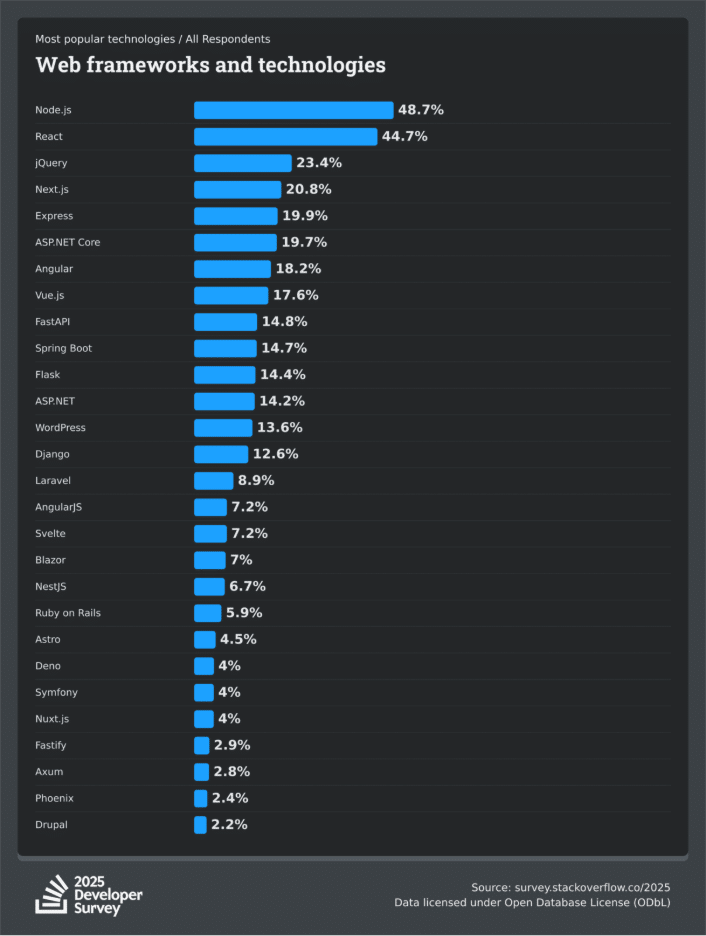
As per the recent 2025 Developer Survey, we noticed a clear trend in developers sticking with frameworks that provide speed and scalability. Let us have a view of ten leading frameworks, where they fit best and who they give the most ROI. For people looking for a framework for their upcoming project, stick to this section because at the end you might land up at the framework you are looking for.
Next.js is a React implementation which adds functionality React never provided directly out of the box such as server-side rendering, image optimization, backend routes, caching layers, etc.
Key Advantages of Next.js
SEO powerhouse with SSR and SSG
Ultra-fast App Router
File-based routing
Built-in API endpoints
Edge-ready and server-component compatible
It doesn’t just help you “build a website” it helps you build production-ready apps with the least amount of complexity.
When to use Next.js
SaaS apps that need speed and SEO
Landing pages or blogs that require high performance
Dashboards and internal tools
Cases where backend and frontend need to live together
2. Express.js: The Minimalist Backend Workhorse
Express is the definition of “simple but powerful.” It doesn’t force you into a strict pattern. It lets you build the backend your way, and that freedom has made it the heart of millions of APIs globally.
Key Advantages of Express
Extremely easy to learn
Minimal structure, you decide the architecture
Massive middleware ecosystem
Works perfectly with Node.js
Whether you’re building a tiny API or a large microservice, Express adapts to your needs.
Where to use Express
REST APIs
Authentication services
Microservices
Servers that need speed without heavy structure
Express is like the Swiss Army knife of backends, tiny, sharp, reliable.
3. ASP.NET Core: The Enterprise Powerhouse from Microsoft
ASP.NET Core is where performance, structure, and security meet. If you’re building something serious about something that handles money, transactions, compliance, or sensitive data .NET Core is built for you.
Key Advantages of ASP .NET
One of the fastest backend frameworks globally
Strong security and identity features
Perfect for enterprise systems
Great documentation with Microsoft backing
Works on all major OS platforms
Where to use ASP.NET
Enterprise apps
Banking, fintech, insurance
Government platforms
Highly secure APIs
Cloud-native microservices
If uptime, structure, and performance are key, ASP.NET Core is hard to beat.
4. Angular: The Complete Frontend Power Framework
Angular is not just a library it’s a full development platform. You get routing, state management, HTTP handling, forms, CLI, build tools, all built in. This makes Angular incredibly powerful for large teams working on huge apps.
Key Advantages of Angular
TypeScript-first approach
Very structured and opinionated (great for teams)
Built-in everything you need
Scales beautifully for enterprise systems
Developers who work on Angular love the consistency and maintainability it brings.
Where to use Angular
Enterprise dashboards
Complex admin portals
Banking & financial systems
Apps that require long-term stability and structure.
Apps that require long-term stability and structure. We agree with the fact that Angular is bit tough to learn but once you get it, this becomes most reliable front end software development framework.
5. Vue.js: The Developer-Friendly, Elegant Alternative
Vue is like the sweet spot between React’s flexibility and Angular’s structure. It’s easy, clean, and gentle to learn yet powerful enough to build large-scale systems.
Key Advantages of Vue
Extremely beginner-friendly
Clean syntax and reactivity system
Flexible structure
Amazing documentation
Strong community (especially in Asia & Europe)
Where to use Vue
Small to mid-sized apps
Prototypes or MVPs
Interactive dashboards
Projects where fast development matters
Vue feels intuitive almost like it “gets out of your way” and lets you build.
6. FastAPI: The Rising Python Backend Star
FastAPI is the Python revolution, the backend world didn’t know it needed. It’s fast, elegant, and built for modern development especially where performance and clean code matters.
Key Advantages of FastAPI
Extremely fast (ASGI-based)
Built-in validation with Pydantic
Automatic documentation (Swagger UI)
Fantastic for AI/ML-heavy apps
Clean and readable codebase
It has become the go-to choice in Python backend development.
Where to use FastAPI
AI / ML APIs
Data-intensive backends
Automation tools
High-performance APIs
Production microservices
If you want Python with speed and a beautiful UI, FastAPI is unmatched.
7. Spring Boot: The Enterprise Backend Giant
Spring Boot is Java’s powerhouse built to run some of the most stable systems in the world. If you’re dealing with enterprise workloads, banking-grade reliability, or distributed systems, this is one of the most trusted frameworks globally.
Key Advantages of Spring Boot
Strong ecosystem (Spring Security, Spring Data, Spring Cloud)
Excellent handling of transactions and concurrency
Works beautifully with microservices
Used by large enterprises in telecom, banking, retail
Where to use Spring Boot
Enterprise-grade APIs
Financial and transactional systems
Long-term stable platforms
Large-scale microservices
Secure, complex backend architectures
Spring Boot’s biggest strength? It’s predictable, secure, and built for systems that must not fail.
8. Django: Batteries-Included Python Framework
Django is the framework that allows you to create fast and secure web applications with good reliability, and you should not over-think architecture just to create these web applications.
Django adheres to the philosophy of batteries included, i.e. it includes nearly everything you need to modernize web development right in the box like ORM, authentication, and an administration panel, migrations, security layers, and other items.
Key Advantages of Django
Comes with built-in ORM, admin UI, and user authentication
Extremely secure
SQL injection, CSRF, XSS protections enabled by default
Perfect for rapid development
Excellent documentation
Where to use Django
Data-heavy applications
Enterprise platforms
E-commerce systems
SaaS products
Social networks and community platforms
Apps requiring strong security or admin dashboards
Python continues to be among the highly demanded AI, ML, and data engineering development languages. Django is the perfect complement of this ecosystem.
9. Laravel: PHP’s Most Loved Full-Stack Framework
If you’ve spent even a few months in web development, you’ve heard of Laravel. It’s the framework that made PHP feel modern again and honestly, it deserves hype.
Laravel is a full-stack PHP framework designed for building clean, secure, scalable web applications. Where Django brings discipline to Python, Laravel brings elegance to PHP. Its selling point? Developer happiness.
Key Advantages of Laravel
Rapid application development
Strong security
Massive ecosystem
Excellent performance with PHP 8+
Built-in API support
Cloud-native tooling (Laravel Vapor)
Where to use Laravel
APIs and backend-first platforms
E-commerce platforms
Learning Management Systems (LMS)
Booking systems
Social platforms
Content-heavy applications
Even with Node.js, Go, and Python frameworks rising in popularity, Laravel continues to grow because it solves real business problems very smoothly.
10. Ruby on Rails: The Full-Stack Web Framework
Ruby on Rails or commonly known as Rails is the framework, which has spawned a generation of developers. That is why startups in the 2010s are able to deliver goods blisteringly fast, and, in fact, Rails is capable of that same magic productivity.
Rails follow convention over configuration, which is just a fancy way of saying: “Don’t worry, we’ve already figured out 90% of the decisions for you.”
Key Advantages of Ruby on Rails
Very developer-friendly
Built-in best practices such as MVC, migrations, routing, helpers
Highly productive
Well-designed tooling (Rails CLI is still unmatched)
Mature ecosystem with gems for almost anything
Where to use Ruby on Rails
Startups building MVPs
SaaS products
Marketplaces
Internal business tools
CRUD-heavy apps
Other Leading Software Development Frameworks
While the above mentioned frameworks often stand as a first choice, yet the software development companyrely on many other frameworks as well. Mentioned are some other leading frameworks with their relevant use cases.
Framework
Category
Language
Best For
Flask
Backend
Python
Lightweight APIs, microservices
Symfony
Backend
PHP
Enterprise apps, secure systems
Laravel
Backend
PHP
SaaS, marketplaces, enterprise apps
Flutter
Multi-Platform
Dart
Mobile, web & desktop apps
React Native
Mobile
JavaScript
Cross-platform mobile apps
Ionic
Mobile / Hybrid
JavaScript
Web-to-mobile apps, prototypes
Nuxt.js
Full-Stack (Vue-based)
JavaScript
SSR apps, SEO-heavy websites
Fastify
Backend
JavaScript
High-performance Node.js APIs
NestJS
Backend
TypeScript
Scalable enterprise Node.js apps
Phoenix
Backend
Elixir
Real-time, fault-tolerant systems
Types of Software Development Frameworks
Before we mov ahead and understand various frameworks, how they work and where to use them, it is important to understand the categories they fall into. Here are five broad types:
1. Frontend Frameworks
These are the frameworks that are responsible for handling what your user will see and interact with in the browsers. These frameworks help you in defining UI, components, styling approaches, interactions, and rendering flow.
Examples: React, Vue.js, Angular, jQuery (legacy but still used), Next.js (hybrid full stack but majorly frontend)
Used for:
Dashboards
SaaS apps
E-commerce UIs
Marketing websites
Admin panels
2. Backend Frameworks
These are the frameworks that support everything going behind the cameras. They run on the server side and handle business logic, APIs, database management, authentication, security, etc.
Examples: Express, FastAPI, Spring Boot, ASP.NET Core
Used for:
APIs
Microservices
Payment processing
Enterprise systems
Authentication services
Data-driven applications
3. Full-Stack Frameworks
These frameworks give you both frontend and backend capabilities under one roof.
Examples: Next.js (front + server), Nuxt, Remix
Used for:
SSR/SSG websites
SEO-friendly apps
Faster development with shared tooling
4. Mobile Application Frameworks
These allow you to build iOS and Android apps using a single codebase.
Flutter
React Native
SwiftUI (Apple ecosystem)
5. Data Science & ML Frameworks
Even though they’re slightly different from app frameworks, they dominate machine learning and AI development.
Before you actually start reading about leading frameworks, a very important thing to understand is frameworks are not libraries. The main difference lies in “Who controls the flow?”
Now you might be thinking about what flow? Execution flow of your application, who decides what runs, when it runs, and in what order.
Library → You control the program flow. Framework → The framework controls the program flow.
So when you are using a library, it’s you who decides how it runs and functions. On the other hand, speaking of framework,it decides how your application will run, you just simply write the code in predefined places.
When should you use Framework?
Large teams
Strict deadlines
Security-first apps
Scalable systems
When should you use a Library?
Small utilities
Experimental projects
When you want less structure
Benefits of Using Software Development Frameworks
Many of you might be thinking while libraries give us full independence to do things our way, what is the need to use frameworks. Let us have a view of various benefits software development frameworks, brings to you.
Faster Development:Frameworks remove all the boring setup work. You get ready-made tools, structures, and patterns, so you focus on building features, noton the basics.
Predictable and Clean Structure:Every file has a place, every function has a purpose. The structure stays consistent, which keeps your project clean even as it grows.
Better Teamwork:When everyone follows the same rules, your team works faster. No confusion, no “where should this go?”the framework already decides that for you.
Built-in Security:Modern frameworks come with security layers baked in. From authentication in ASP.NET Core to CSRF protection in Django, you get safety without extra effort.
Easy to Scale:Whetheryou’re building with Express, Spring Boot, or Angular, frameworks make scaling smooth. You can handle more users, data, and features without breaking the system.
Strong Community & Ecosystem:Bigsoftware development frameworks come with huge communities, plugins, and libraries. If you get stuck, chances are someone has already solved that problem for you.
Understanding The Working of Frameworks
Set the base structure:The framework creates the main folders, routing flow, and the overall shape of your app. Youdon’t start from a blank page you start from a solid foundation.
Handle all the behind-the-scenes:Things like routing, rendering, middleware, state, and security are built-in. You just plug your logic into the right places instead of building these pieces from scratch.
Control the program flow:The framework decides when your code should run and handle the flow. This removes guesswork and keeps everything predictable.
Standardize how your team writes code:everyone follows the same folder structure, function placement, naming patterns, and architectural flow. This reduces confusion and makes collaborating easier.
Integrate common tools automatically:APIs, authentication, databases, caching — frameworks connect these parts smoothly. You don’t waste time wiring everything together manually. When you pair this with the right testing setup, your work becomes even stronger. Read more about testing tools at: Top 10 Software Testing Tools for 2026
Help you ship faster with less risk:With so many problems already solved inside the framework, you write less code and make fewer mistakes. Your app becomes cleaner, safer, and production-ready much sooner.
AI and the Future of Frameworks
AI isn’t just affecting coding it’s actively reshaping how frameworks are built and used. We’re heading toward a future where AI builds frameworks optimized for specific app types of performance-tuned, auto-scaling, and smart by default.
AI is writing boilerplate code Developers are no longer wasting hours on setup. Copilot, GPT-based tools, and other assistants can generate models, routes, and even full modules for frameworks.
Frameworks are becoming AI-native
Next.js supports AI routes and edge-based inference
FastAPI has become a favourite for ML and data pipelines
Express and Node.js are powering AI microservices everywhere
Frameworks are slowly shifting from “web only” to “AI + web.”
Testing & debugging are becoming automated AI can now scan logs, detect patterns, suggest fixes, and even write test cases. This reduces development cycles drastically.
Documentation is becoming interactive and AI-assisted Frameworks with AI-friendly documentation grow faster simply because developers understand them quickly.
Decision Guide for Choosing the Right Framework
Decision Factor
Questions to Ask
Recommended Frameworks
Why These Options?
1. Type of Application
What kind of app am I building?
UI-heavy apps: React, Vue, Angular SEO-first websites: Next.js Enterprise backend: ASP.NET Core, Spring Boot High-speed APIs: Express.js, FastAPI
The selection of software development frameworks is not only about making a selection of a tool; it is also about making a selection of the framework on which your entire product will operate. A proper structure will provide a structure to your project, do the repetitive tasks on your behalf, and make sure that your team delivers features rather than re-creating the foundations.
It brings all the people to the same patterns, gets away from the non-essential complexity and ties all the moving components of your application to trusted, inbuilt mechanisms. Finally, frameworks are useful in making you concentrate on what is important, creating wonderful user experiences, scaling without fear, and producing quality software in a shorter period of time.
You will make better decisions when you know the mechanisms behind the scenes, technical agony is avoided, and you establish your project to be successful in the long run.
Frequently Asked Questions
1. Why should I use a web development framework instead of just HTML/JS?
Frameworks eliminate heavy lifting. You do not have to put together routing, state handling, architecture and security without an underlying foundation, but with an already battle-tilled foundation. It implies that you will use less time on troubleshooting core plumbing and more time developing actual features.
2. What is the use case of Django, React, or Angular?
These frameworks make the development process more straightforward as they provide ready-made implementations of routing, rendering, APIs, middleware, and the structure of a typical app, in general. The biggest strength is uniformity – everyone works in the same patterns, and it is easier to work together and create a final product less dependent on luck.
3. Are frameworks disadvantageous or risky to use?
The danger of selecting the inappropriate tool on the inappropriate type of project is the sole actual risk. Each framework comes with an opinion as to how things ought to be organized, which is excellent in terms of them being stable, but they can be a limitation in terms of your app needing very custom behavior.
4. Do I have to learn various frameworks to be a good developer?
Not really. Rather start with one framework in the language you are comfortable in, master it with the best and then move to another framework.
A wrong software partner won’t just drain your budget. It drains your momentum and your confidence. It makes you question all the decisions that you made.
Everything looked perfect from the beginning. The team sounded sharp, their “yes, we can handle everything” felt reassuring.
After a few months, the cracks will show. There will be delays, and the quality of the software is disappointing.
If you want to avoid the mistakes we made, this article will be on your checklist. It’ll help you choose the right partner. It won’t be the surface-level checklist that everyone recycles.
Why Choosing The Right Software Development Partner Matters
Choosing the right software development company matters. The right partner challenges your thinking; the wrong one makes you think for them.
If you’re building your custom software from scratch or scaling your existing software, the right partner will make your investors feel confident and help you acquire more customers.
6 Red Flags to Avoid
Choosing the right vendor isn’t as straightforward as it seems. Even if their online reviews and portfolios impress you, don’t ignore the warning signs. Don’t choose a vendor just because it feels “right”.
Confidence doesn’t always mean competence. And timelines are useless if there isn’t deep research. Here are the red flags that you need to watch out for:
1. They Can’t Explain Their Reasoning
If a team cannot explain the reasoning behind each process, they’re hiding behind technical jargon. Also, if they’re unable to communicate clearly with you or your team, that’s dangerous. As a business owner, your vendor should tell you how this software saves you money or improves scalability.
2. Generic Testimonials
Their previous clients don’t mention what they liked about the company. The testimonials are generic and vague. The lack of genuine testimonials will signal a poor work ethic. Real clients will mention the challenges they faced and the outcomes they’ve received.
3. No Ongoing Support
Many teams will do a good job at the initial stage. But if they disappear after the project is complete, you’ll be expected to handle the bugs and user issues alone. A trusted software development partner will offer ongoing support.
4. Extremely Low Prices
While they may seem too good to be true, developing a software isn’t a cheap process. If they’re offering low prices, it’ll come with hidden pitfalls. The company will have junior developers or use outdated tools to build your custom software. This can lead to frequent breakdowns.
5. No Defined Project Owner
Confusion can occur in the absence of a project coordinator. A project coordinator should serve as the link between the internal team and the client.
6. They Agree to Everything You Say
Don’t get us wrong. If your partner agrees to everything you say, they aren’t challenging you enough. They have a fear of losing the deal and losing you as a client. A strong partner will have questions to ask you and suggest better methods to meet your goals.
6 Things to Look for in the Right Software Development Partner
After all the things that you need to avoid, the eligibility criteria have changed. Here are 6 things you need to look out for:
1. They Push Back with Clarity
Regardless of the skills, reviews, and a portfolio, pick a team that pushes your ideas. “Why do you want this feature?” or “What is the goal of the business outcome?”
Such inquiries indicate their care for your growth.
2. They Document Everything
Documentation can save you hours of rework and prevent accidental scope changes. Having a detailed document of your software will:
Protect you from legal issues
Lead to a higher customer satisfaction level
Fewer support requests
Documentation ensures your software remains sustainable and aligned with your business goals.
3. They Take Ownership
They’ll take proactive measures to suggest alternative solutions. They’ll tell you which testing tools should be used, what needs rethinking, and what needs to be fixed. They’ll anticipate such situations and take full ownership of all the tasks.
4. They Show the Team
You’ll know exactly who is working on building your software. Companies offering software consulting services have a team of:
Experienced developers
Project managers
Designers
You’ll know who to reach out to and receive full transparency.
5. Actual Case Studies
Their portfolio shows a diverse range of case studies. These case studies show:
The challenges they solved
Measurable outcomes
Approach they followed
The tools they used
The case studies won’t have any fancy buzzwords. It should tell you the real problems they solved and not just a technical task they completed.
6. They Prioritize Clarity
Work alongside a partner who communicates clearly. They won’t hide their processes from you. You’ll know exactly what’s happening in the project and the approach to risks. They’ll also break down the complexity into smaller steps.
Before You Begin: What Stage Are You In?
Before you make the final decision, ask yourself 1 question: What stage are you in?Depending on where your software stands and what your priorities are, you need to choose a software development partner who helps you move forward.
Stage 1: Minimum Viable Product (MVP)
If you’re building software from scratch, don’t fall into the feature fantasy trap. You have a vision that you want to follow. But you also have blind spots. Look for a partner who:
Suggests a simpler workflow
Cuts unnecessary features without hesitation
Focuses on the why behind every requirement.
A bad partner will nod at everything you say, even if the tech stack is excessive. A good partner will question half your assumptions – Firmly and respectfully.
Stage 2: Moving Past MVP
During this stage, you don’t want to work with generalists. You want to work with an experienced team who will:
Stress test your architecture
Introduce better workflows
Identify the areas where your software will break down.
Your approach to building your software will change at this stage. You’ll focus more on performance, maintainability, and long-term costs.
Stage 3: You’re Migrating or Modernizing
It looks easy on paper, but it isn’t glamorous. You’d need to work with developers who think outside the box. The right partner will:
Spot hidden risks before your software goes live.
Plan migrations in a realistic timeline.
Analyze your existing software and understand older frameworks.
Very few companies know how to work with legacy software and predict issues without disrupting anything.
Why This Identification Stage Matters
Knowing which stage you’re in will directly impact your:
Technical Needs
Your Long-Term Project Success
Business Goals
You’d want to work with a company that has stage-specific expertise. Different phases will demand distinct skills:
MVP development needs simplicity and strategic prioritization
Scaling requires architecture and workflow improvements
Migration and modernization demand experience with legacy systems and risk planning.
Choose a partner that understands your stage and offers guidance in process planning and supports your evolving business objectives.
5 Questions You Should Ask
The answers to these 5 questions will help you avoid making the wrong choice. These questions dig deeper into how a company approaches software development.
Q1. What issues do you see in this project?
A weak partner might say “We don’t see any issues.”
A strong company will tell you:
Limitations your software has
Integration challenges
Technical unknowns
A strong vendor won’t shy away from telling you the risks. If a team cannot tell you the improvement areas, they might be inexperienced.
Q2. How would you measure the success of this project?
You should be looking for metrics like:
Milestones Achieved
Clear KPI (Key Performance Indicators)
Post Launch Stability
Performance Metrics
Their definition of success should match yours.
Q3. How do you handle project delays and sudden scope changes?
It’s common for a project to hit turbulence. But the difference lies in the response. A strong partner would:
Tell you about the delay
Their escalation process
How they prioritize their tasks
The re-estimation cost when things change
This question will test their maturity. Experienced teams will follow the process. If the answer sounds too polished, the project will go off the rails.
Q4. Walk me through the last technical challenge your team solved.
A trusted company will tell you the story behind the technical challenge they faced. They’ll explain how they approached the problem and mention the outcome in simple terms. A weak partner would:
Hide behind buzzwords
Give vague answers
Skip over the problems
Leave you feeling confused
If they can’t describe how they solved tough problems, they won’t be able to solve yours.
Q5. Who will work on my project?
You’ll need names. You’ll need to know the title. You need to know the people behind your project. Asking this question will reveal:
If they have a full-time team or freelancers
If they’re going to outsource the project
If you get stable continuity.
If your partner hesitates to answer this question or gives a vague answer, you know it’s time to move on.
Final Checklist
To sum up the checklist, here is your checklist:
Shows real case studies
Has a structured communication plan
Assigns a clear point of contact
Can explain their development workflow
Pushes back when needed
Offers post-launch support and transparency
Speaks in simple language
Concluding Words
We’re dependent on software. They’re key to several of our activities, such as accounting, task management, and CRM. We have to partner with a vendor if we want to get a custom software build.
Choosing the right one can be a tedious process. But if you know the warning signs that you must avoid and the questions you should ask, you’ll be able to decide in no time.
Remember, choosing the right partner isn’t luck. It’s preparation. Use this blog as your cheat sheet and make the right decision.
Frequently Asked Questions
Q1. How do I know my vendor is technically capable?
Question them regarding the projects they have completed, the tools they use, and how they go about them. A technical interview could be done to test their knowledge.
Q2. How do I evaluate my partner’s technical depth if I’m not a technical founder?
This is challenging but it’s achievable. Look at their case studies and request clear explanations. Follow up on the best practices their developers follow for code quality.
Q3. How do I ensure a successful software development partnership?
You can do so by following this process:
Define clear expectations
Establish achievable milestones
Have open lines of communication
Actively monitor progress
Provide prompt feedback
Q4. Can I expect post-launch support?
Of course! Most companies will be happy to offer you support after the project is complete. If you want to upgrade your software to the latest version or need to get bugs fixed, their team is 1 phone call away.